

In part one, we explored code quality. In part two, we looked at developer experience. Now it’s time to connect those foundations with repeatable builds, dependency management and releases.
“It works on my machine” is not a release process. We’ve all said it. We’ve all regretted it. 🙈
In embedded work the stakes are a bit higher. A working system depends on application packages, native firmware, build tools and the capabilities of a specific board. Getting all of that right once is nice. Getting it right every time is the real job.
.NET nanoFramework uses Azure DevOps and GitHub Actions for different parts of that job. The tools matter less than how the process is captured and reused.
One recipe, many repositories
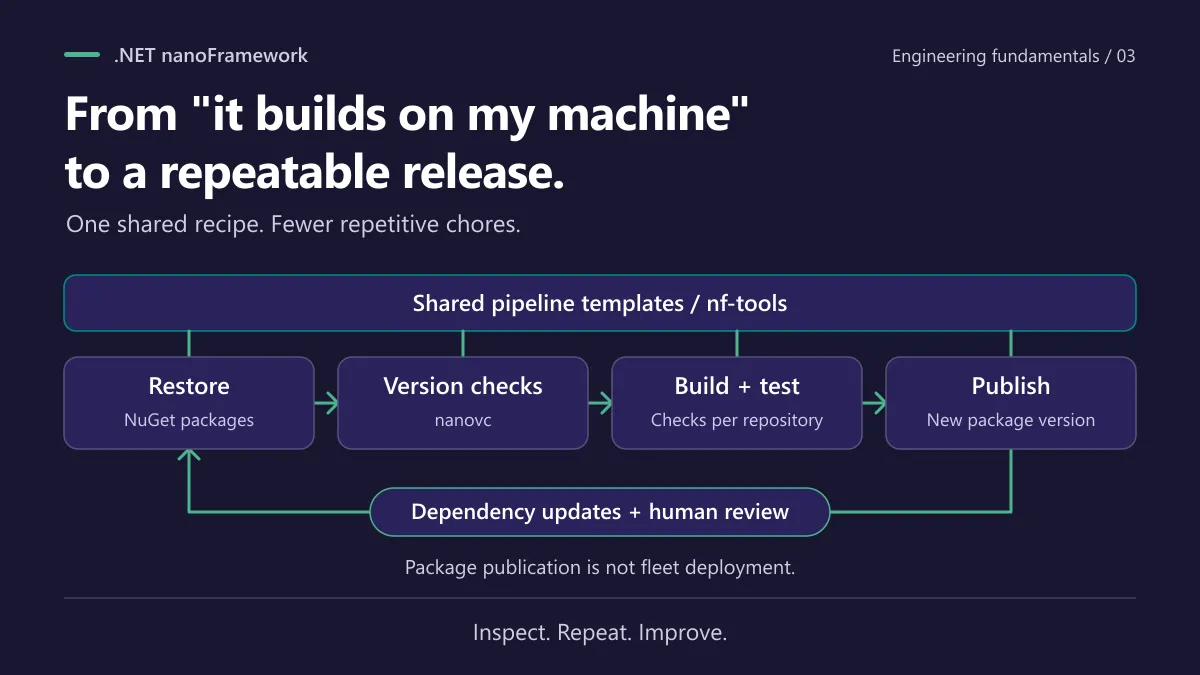
The nf-tools repository holds reusable Azure Pipelines templates for building, packaging, publishing, testing and updating dependent libraries.
Instead of every repo keeping its own slightly different release script, each one references the shared steps and adds what’s specific to it. Let’s make it concrete with System.Net, the library behind networking on nanoFramework. Here’s its azure-pipelines.yml, trimmed down to the essentials:
# Point at the shared templates living in nf-tools
resources:
  repositories:
    - repository: templates
      type: github
      name: nanoframework/nf-tools
      endpoint: nanoframework

variables:
  - name: nugetPackageName
    value: 'nanoFramework.System.Net'

jobs:
- job: Build_Library
  pool:
    vmImage: 'windows-latest'
  variables:
    - name: buildConfiguration
      value: 'Release'
    - name: solution
      value: 'nanoFramework.System.Net.sln'
  steps:
  # One line brings in the whole build, update and publish recipe
  - template: azure-pipelines-templates/class-lib-build.yml@templates
    parameters:
      sonarCloudProject: 'nanoframework_lib-nanoFramework.System.Net'
      runUnitTests: false
That’s the heart of it. The pipeline declares where the templates live, names its solution and package, and then hands over to class-lib-build.yml, which the pipeline’s own comment describes as covering the “build, update and publish steps”. Those steps aren’t rewritten in the repository.
The real file does a bit more, and it’s worth a look. It adds a job that triggers dependency updates in the libraries that depend on System.Net (more on that further down), and another that reports a build failure to Discord, both through shared templates as well. Also note runUnitTests: false in that pipeline: the shared recipe offers unit tests, and each repository decides whether to switch them on.
The logging library’s pipeline follows the same pattern, with the build template, analysis and tests turned on, plus packaging and publishing for each of its packages.
The payoff is simple. Fix something in a shared template and every repository using it can benefit, without a copy-paste marathon. How much depends on which template versions and options each repo uses, naturally.
And the build template is honest about it: things like unit tests are parameters you turn on. Shared infrastructure makes consistency possible. It doesn’t claim every repo runs every check.
Keeping dependencies in sync (the boring job nobody wants) 😴
Publishing a package isn’t the end of the story. Other libraries depend on it, and someone has to update the references, check the builds and open the PRs. Multiply that across dozens of repositories and you get a serious maintenance tax.
The shared dependent-update template waits for the new version to appear on NuGet and then dispatches GitHub events that trigger the dependency-update workflows. Humans stay in the loop for review, but the repetitive coordination is gone.
Automation here doesn’t prove the new dependency is compatible, though. Builds, tests and review still do that work.
nanovc: because versions love to drift 🧭
There’s one more classic trap in a package ecosystem. A project references one version of a package, the .nuspec file that describes the NuGet package says another, and nobody notices until a developer installs the published package and gets a confusing mismatch. Fun to debug. 🙃
That’s the job of nanovc, a small .NET tool from the nf-tools toolbox. Its NuGet page describes it as a tool to check for version mismatches in nanoFramework builds, meant for the CI/CD pipelines. In practice, it checks that the .nuspec files and the NuGet packages stay aligned and up to date, so a mismatch fails the build instead of reaching your users.
You don’t have to wire it up by hand. The shared versions-check template installs it with dotnet tool install -g nanovc and runs it against the solution, provided the preceding steps succeeded. It skips installation and checking for release-candidate builds (StartReleaseCandidate is true) and version-tag builds (the source ref starts with refs/tags/v). On PR builds it adds the --analyse-nuspec option, so the nuspec dependencies get analysed too. And since the class-library build template includes that step after the NuGet restore and before the build, repositories using it get the check automatically when those conditions allow it. That’s the shared-recipe idea again.
It pairs nicely with the dependency updates above: the updates bring versions forward, and nanovc makes sure nothing got left behind. It’s still a version check, not a compatibility test. The build and tests remain the judges of whether things actually work together.
Even the dev environment gets tested
Here’s a detail worth a smile. A dev container smoke-test workflow builds selected firmware targets for pull requests that change files under .devcontainer/ or .github/workflows/. Direct pushes do not trigger this workflow.
Why bother? Because a broken toolchain blocks contributors just as effectively as broken code. Testing the environment is a small thing that says a lot.
The difference
When release engineering is left to each repository, you get different scripts, different assumptions and plenty of room for mistakes. When it’s shared and visible, you can read how a library is built, maintainers can improve the common steps in one place, and bots handle the repetitive chores.
Product teams still have work to do: pin compatible versions, validate on real hardware, roll out carefully to deployed devices. Publishing a package is not the same as safely updating a fleet.
CI/CD turns “someone remembers the steps” into a process anyone can inspect, repeat and improve.
© Laurent Ellerbach. This post is licensed underCC BY-ND 4.0: you may share it unchanged, with credit and a link back. To adapt or translate it, ask the author first.
Comments
Comments are powered by GitHub Discussions. Sign in with GitHub to join in. By commenting, you agree to publish your comment under CC BY 4.0.